Tuesday, January 28, 2014

File Format for dummies

ever been in a situation where you finished a project and  ending up confused and dumb because you do not know what file format you should use to save your project.

Say good bye to those situation!
heres the solution.

just try to remember them. hehehe

first of all there are 2 types of file formats

  1. lossy - It eliminate "unnecessary" bits of information, tailoring the file so that it is smaller. This type of compression is used a lot for reducing the file size of bitmap pictures
  2. lossless - Saves the original data, it doesn't change any elements inside the data 

Image


  1. JPEG - jpeg is lossy file. a jpeg (joint photographic expert group) it is capable of showing 16.8 million colors. it doesn't have a transparent property.
  2. GIF -The format supports up to 8 bits per pixel for each image, allowing a single image to reference its own palette of up to 256 different colors chosen from the 24-bit RGB color space. It also supports animations and allows a separate palette of up to 256 colors for each frame. These palette limitations make the GIF format unsuitable for reproducing color photographs and other images with continuous color,
  3.  PNG -a raster graphics file format that supports lossless data compression. PNG was created as an improved, non-patented replacement for Graphics Interchange Format (GIF), and is the most used lossless image compression format on the Internet.
  4.  PSD - Photoshop format it has layers.
  5.  TIFF -a file format for storing images, popular among graphic artists, the publishing industry,[1] and both amateur and professional photographers in general
  6. BMP -also known as bitmap image file or device independent bitmap (DIB) file format or simply a bitmap, is a raster graphics image file format used to store bitmapdigital images, independently of the display device (such as a graphics adapter), especially on Microsoft Windows and OS/2 operating systems.
  7. AI - this format is used by Adobe Illustrator this is a vector graphics.


MOVIE


  1. MP4 - a digital multimedia format most commonly used to store video and audio, but can also be used to store other data such as subtitles and still images.
  2. AVI -AVI files can contain both audio and video data in a file container that allows synchronous audio-with-video playback. Like the DVD video format, AVI files support multiple streaming audio and video, although these features are seldom used.
  3. 3GP -a multimedia container format defined by the Third Generation Partnership Project (3GPP) for 3G UMTS multimedia services. It is used on 3G mobile phones but can also be played on some 2G and 4G phones.

Tuesday, January 21, 2014

Blog day! again :|

GOOD morning :|

Today marks the first day of our.. never mind.

.
sigh

what I learned to mates.

using blending options and kuler

1st of all what is a kuler
kuler is an extension app for adobe photoshop
it's like a colorwheel
this app allows you automatically  create a color scheme.

here is my artwork


Tuesday, January 7, 2014

PHOTOSHOP TOOLS

ARG! wednesday! BLOG!

Hello everyone..
today I learned some new things

I will be focusing on those new things that I learned.

lets get started!

1st the Pentool!!
I already know how to use this well the basic that is like how to add/delete anchor points, creating shapes and path using pentool. but this I did not know you can ACTUALLY TYPE ON THE PATH THAT YOU CREATED! holly shi!! I DID NOT KNOW THAT!

2nd the PAINT BRUSH!
The nothing new,  brush setups, adding and removing brush styles, adjusting the brushes

3rd LAYERS
blending options, layer opacity, layering, organizing layers

And here are some artworks that I did today
some artworks that I did


I will just make another blog entry for my other art works

Tuesday, December 3, 2013

Make a Design from CRAP!

alright mate today well be doing CRAP!

I mean

C- contrast
R- repetition
A- alignment
P- proximity

Contrast 
 By simply making your design a little bit different from one another . this gives a feeling of visual attraction

Repetition
repetition of text, styles, textures this makes your design more uniformed

Alignment 
By making you design aligned it gives a balanced feeling . it also makes it more pleasing to the eye aw well as connecting every element for your design.

Proximity
proximity is the space between each element of your design. by grouping these elements closer together it becomes more organized and easier to understand.

COLOR ( ) if you know what I mean

HELLO MATE! you know what day it is. Its WEDNESDAY!!

Today we will be talking about Color space.


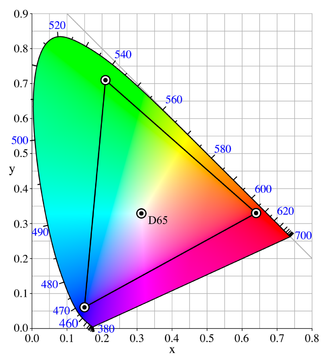
What you can see on your left is a color space

(you noob)

as you can see there are different kinds of color space like 

ProPhoto RGB
Adobe RGB
sRGB
CMYK
Lab


Whats is a Color space?

A color space is A color model is an abstract mathematical model describing the way colors can be represented as tuples of numbers, typically as three or four values or color components example RGB, CMYK
RGB(red, green, blue)  CMYK(cyan, magenta, yellow, black) this are color modes
basically you'l be using RGB more often that CMYK.


     sRGB


sRGB stands for smaller RGB

sRGB is a standard RGB color space created cooperatively by HP and Microsoft in 1996 for use on monitors, printers and the Internet.


  Adobe RGB 98


Adobe RGB color space is an RGB color space developed by Adobe system in 1998. It was designed to encompass most of the colors achievable on CMYK color printers, but by using RGB primary colors on a device such as the computer display. The Adobe RGB color space encompasses roughly 50% of the visible colors specified by the Lab color space as well as improves upon the gamut of the sRGB color space, primarily in cyan-greens.


  ProPhoto RGB

 ProPhoto RGB color space, also known as ROMM RGB (Reference Output Medium Metric), is an output referred RGB color space developed by Kodak. It offers an especially large gamut designed for use with photographic output in mind. The ProPhoto RGB color space encompasses over 90% of possible surface colors in the CIE L*a*b* color space, and 100% of likely occurring real world surface colors making ProPhoto even larger than the Wide Gamut RGB color space. The ProPhoto RGB primaries were also chosen in order to minimize hue rotations associated with non-linear tone scale operations. One of the downsides to this color space is that approximately 13% of the representable colors areimaginary colors that do 


  CMYK

CMYK color model (process color, four color) is a subtractive color model, used in color printing, and is also used to describe the printing process itself. CMYK refers to the four inks used in some color printing: cyan, magenta, yellow, and key (black). Though it varies by print house, press operator, press manufacturer, and press run, ink is typically applied in the order of the abbreviation.


L*a*b*


A Lab color space is a color-opponent space with dimension L for lightness and a and b for the color-opponent dimensions, based on nonlinearly compressed CIE XYZ color space coordinates.


Wednesday, November 27, 2013

BASIC DESIGN COMPOSITION

Hello mate! its wednesday again! you know the drill!

oh yeah! before we do anything! I (Robert Manzo)  made a big mistake regarding
my last blog entry (what blog entry?) that's the mistake right there I thought that
I publish my 2nd blog entry . well I'm trying to fix that
sorry for the delay . it is published now
yey for me! ok moving on.

rule of thirds . (I think?)

take an image and apply the rule of thirds

                  before                                   and                                     after


The GOLDEN MASK


 yeah, yeah I know I look like a ROBOT!

In art there is a certain ratio you need  to follow in order for you to create a pleasant looking design/ artwork 

What is it?

ever heard of the golden ration?
back then during the Renaissance era artist follows a certain formula.
that is 1 : 1.618
this makes your artwork more proportioned 

setting up my photoshop (basic settings)

It's Wednesday again! New Intel about Designing and coloring!
But before we tackle about Designing and coloring sh.. stuff
we must first setup our Photoshop 

YEY!!! wait.. WHAT!! nobody got time for that. I wanna create art!!!

Calm your self young artist. Before you can create a design or an art work first learn the basics of photoshop.

ok...but make it quick

OK so lets get started FIRTS of all what kind of Operating System are you using is it a PC or a MAC?
why am I asking you this? because there's a little difference between the two specially the keys 
A MAC has a "COMMAND" and "OPTION"key while a PC has "ALT" and "CONTROL"

MAC                  PC
command   -   control
option        -     ALT

try getting used to the idea if you are using a MAC
ok moving on!

To change the settings of your Photoshop you need to open the PREFERENCE tab. How?
1st open your PS and go to the EDIT tab is you are using a PC, If you're using a MAC go to the photoshop tab at the upper left most part of your window, Click that and find the PREFERENCE tab,
OR just CTRL+K on PC, COMMAND+K

now that you opened your preference
there should be a window
inside that window you will see many words. DUH!!

there will be a selection on the left side of the window
you will see these words inside

GENERAL - basically handles general stuff like size of image, zooms etc
INTERFACE - screen colors, menus, UI text options etc
FILE HANDLING - management of file 
PERFORMANCE - ram and this is where you can adjust you PS performance
CURSORS - cursors you can make it more visible just put it on NORMAL 
TRANSPARENCY and GAMUT - you know that checkered pattern this is where you can change its colors
UNITS RULERS - change the units to inches if you are going to print and pixels for internet use
GUIDES and GRIDS - noting important here. color changer for the grids
PLUGINS - if you have plugins
TYPE - FONT sizes , font names.

after that you're DONE!

OH!! you need to press ok and restart you photoshop before the changes apply.
happy editing